Bulk Import Best Practices & FAQ
The Crunchafi Lease Accounting Bulk Import feature allows users with over 30 leases to efficiently upload large lease portfolios by using a specific, unmodifiable template accessed via the Add Leases > Manual entry > Bulk Import path, with detailed instructions and mandatory Review + Approve workflow to ensure proper administration setup and avoid template errors during import.
Bulk Import Best Practices
Review the information below to get started with our Bulk Import feature
When should I use the bulk import template?
The Bulk Import Template can be used to import a large lease portfolio into Crunchafi Lease Accounting all at once. We recommend using bulk import if you have more than 30 leases.
Where do I start the bulk import process?
Go to Add Leases in the top navigation bar and select Manual entry. Click the Bulk Import button located in the top-right corner.

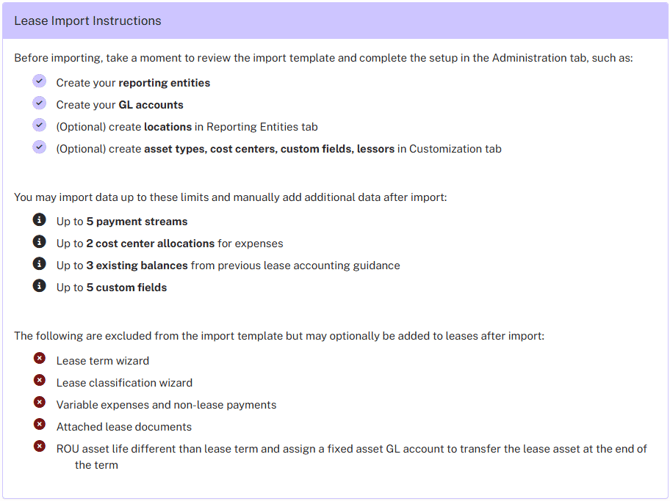
On the import leases screen, read the Lease Import Instructions. The instructions will guide what Administration setup needs to occur before importing the template, and what the limitations are. The most up-to-date bulk import template is available on the left.
Can I modify the import template or create my own?
No. You must use the template provided in the software. If any changes are made to the template or if a different template is used, it will cause a template error and the import will fail.
Does Review + Approve still apply to bulk import?
Yes. If you don't want to use the Review + Approve workflow when importing your leases through bulk import, you will first need to go to Administration > Policies and de-select the Review + Approve box.
Does Crunchafi Lease Accounting do a partial import of leases if there are errors in my file?
No. It will only import the leases once all errors have been cleared. Once the import is complete, the leases will appear My Leases list.
For more information on troubleshooting import errors, please see our Troubleshooting Bulk Import Error Logs article.
Are there any limitations to bulk import?
Yes. Bulk import can only be used for initially adding leases into Crunchafi Lease Accounting. There are also limitations on the data that can be initially imported:
- Up to 5 payment streams
- Up to 2 cost center allocations for expenses
- Up to 3 existing balances from previous lease accounting guidance
- Up to 5 custom fields
After a successful bulk import, additional data can be added to a lease manually.
Was this article helpful?
YesNo