Entering Semi-Annual Payments in Crunchafi Lease Accounting
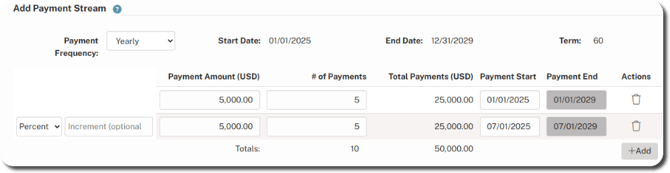
To enter semi-annual (bi-annual) lease payments in Crunchafi Lease Accounting, users should input two separate annual payment streams, each scheduled on one of the two payment dates.
Entering Semi-Annual Payments
For bi-annual payments, use two annual payment streams as described below.
To enter bi-annual payments, enter two annual payment streams, each occurring on one of the dates. Below is an example:
Was this article helpful?
YesNo