Initial Journal Entries
The document explains how to locate the initial journal entry for a lease in Crunchafi Lease Accounting by either exporting the Journal Entries report from the Data tab for the lease start month, where the initial recognition entry appears at the top of the Data tab, or by viewing the Initial Journal Entry columns in the Lease tab of any Excel report generated by the system.
Initial Journal Entries
See below for instructions on how to find the initial journal entry associated with a lease
There are two main ways to find the initial journal entry associated with a lease: 1) from the Data tab of the Journal Entries report, or 2) the Leases tab of any report.
Data tab of the Journal Entries Report
- 1.Select the desired lease on the My Leases tab.
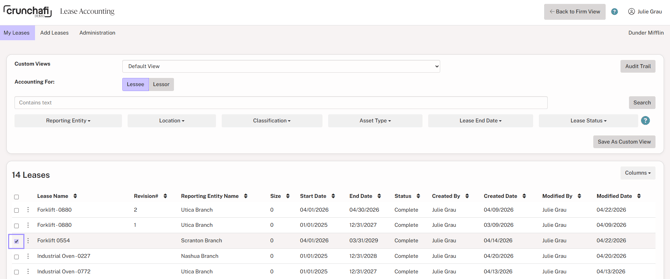
- 1.Select the GL date range for the month in which the lease begins and click Export XLS to the right of Journal Entries under the Reports section.

- 1.
The Journal Entries report will download to your downloads folder.
- 2.
The first lines of the Data tab of the Journal Entry report show the initial journal entry to recognize the lease. If there are any balances from pre-existing lease accounting guidance, the recognition is also posted in the initial journal entry.

Leases tab of Any Report
- 1.
Every Excel report from Crunchafi Lease Accounting contains a Lease tab.
- 2.
Select the Lease tab and scroll to the columns labeled Initial Journal Entry in row 1.
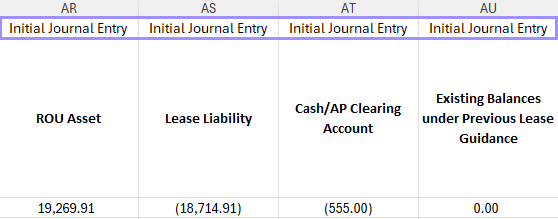
- 1.These columns show the initial journal entry for all leases included in the report query.
Was this article helpful?
YesNo