Report Center
The Report Center on the My Leases page, accessible via an icon in the lower-right corner, displays reports you have run in the last 45 days (excluding those run by others in your organization), showing details such as report name, GL date range, run time, lease count, and a redownload button, while managing report exports with visual indicators and automatic downloads that require browser permissions and remain accessible if the page is closed or navigated away from.
Report Center
Learn how to use the Report Center on the My Leases page
The Report Center can be accessed by clicking the icon located in the lower-right corner of the My Leases page. This shows reports you have run in the last 45 days. It will not, however, show reports run by other users from your organization.
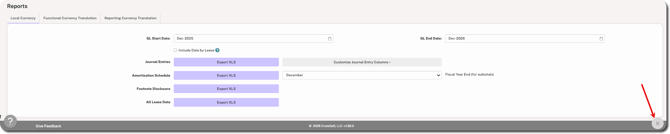
An example of the Report Center is shown below:
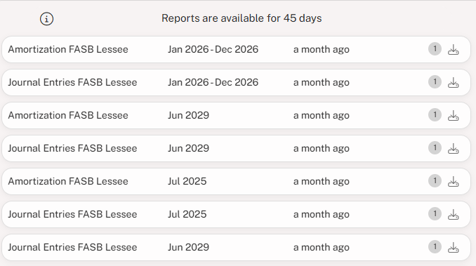
The list of reports contains the following information from left to right:
- The name of the report
- The GL Date range (not applicable for All Lease Data)
- How long ago the report was run (e.g, 5 minutes ago, a month ago, etc.)
- The number of leases contained within the exported report
- A button to redownload the report to your computer
When you click Export XLS on any report, the Report Center icon begins spinning, indicating the report is being processed. A badge appears on the icon showing the number of recently run reports. Reports are downloaded to your device automatically upon completion.
If multiple reports are exported they will be downloaded as separate files, which on some browsers will require permission for simultaneous downloads.
NOTE
If the browser is closed or you navigate away from the My Leases page, reports will not automatically download. They will, however, be available in the Report Center and can be accessed by clicking the download icon at the far right.
Was this article helpful?
YesNo